Use of Firefox capability


      public static void chromeDriverRemote(RemoteWebDriver driver) {
           // create a ChromeOptions object
           ChromeOptions options = new ChromeOptions();
           // adding a extension to the chrome
           options.addExtensions(new File("C:\\DRIVE\\My Documents\\Downloads\\AdBlock_v2.46.crx"));
           // loading a profile to the chrome
           options.addArguments("user-data-dir=C:\\Users\\sudas\\AppData\\Local\\Google\\Chrome\\User Data\\sudas");
           // maximize chrome
           options.addArguments("start-maximized");
           // Create a DesiredCapabilities object
           DesiredCapabilities capability = new DesiredCapabilities();
           // Use the DesiredCapabilities method
           capability.setBrowserName("chrome");
           // use the DesiredCapabilities method capability.setCapability(String key, Object value);
           capability.setCapability(ChromeOptions.CAPABILITY, options);
           try {
                // STEP 01
                driver = new RemoteWebDriver(new URL("http://10.129.63.183:4444/wd/hub"), capability);
           } catch (MalformedURLException e) {
                // TODO Auto-generated catch block
                e.printStackTrace();
           }

  public static void getSystemEnvironmentMap() {
  Map envmap = System.getenv();
  Set> set = envmap.entrySet();
  Iterator> iterator = set.iterator();
  while (iterator.hasNext()) {

   Entry entry = iterator.next();
   System.out.println(entry.getKey());
   System.out.println(entry.getValue());
  }
 }
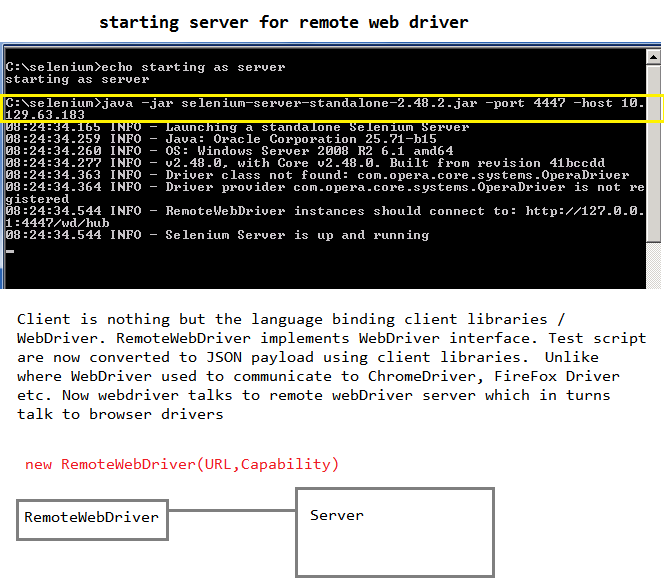
      public static void ieRemoteWebDriver(RemoteWebDriver rwd) {
       DesiredCapabilities desiredCapabilities = DesiredCapabilities.internetExplorer();
       desiredCapabilities.setCapability(InternetExplorerDriver.INTRODUCE_FLAKINESS_BY_IGNORING_SECURITY_DOMAINS, true);
       try {
       rwd = new RemoteWebDriver(new URL("http://10.129.63.183:4444/wd/hub"), desiredCapabilities);
       } catch (MalformedURLException e) {
       // TODO Auto-generated catch block
       e.printStackTrace();
       }
      }
      public static void ieRemoteWebDriver(RemoteWebDriver rwd) {
           DesiredCapabilities desiredCapabilities = DesiredCapabilities.internetExplorer();
           desiredCapabilities.setCapability(InternetExplorerDriver.INTRODUCE_FLAKINESS_BY_IGNORING_SECURITY_DOMAINS,
                     true);
           try {
                rwd = new RemoteWebDriver(new URL("http://10.129.63.183:4444/wd/hub"), desiredCapabilities);
                Capabilities actualCapabilityes = rwd.getCapabilities();
                System.out.println(actualCapabilityes.getVersion());
                System.out.println(actualCapabilityes.getBrowserName());
                System.out.println(actualCapabilityes.getPlatform());
           } catch (MalformedURLException e) {
                // TODO Auto-generated catch block
                e.printStackTrace();
           }
      }
| Key | Type | Description |
| browserName | string | The name of the browser being used; should be one of {android|chrome|firefox|htmlunit|internet explorer|iPhone|iPad|opera|safari}. |
| version | string | The browser version, or the empty string if unknown. |
| platform | string | A key specifying which platform the browser should be running on. This value should be one of {WINDOWS|XP|VISTA|MAC|LINUX|UNIX|ANDROID}. When requesting a new session, the client may specify ANY to indicate any available platform may be used. For more information see [GridPlatforms] |
   DesiredCapabilities desiredCapabilities = DesiredCapabilities.internetExplorer();
           desiredCapabilities.setCapability(InternetExplorerDriver.INTRODUCE_FLAKINESS_BY_IGNORING_SECURITY_DOMAINS,
                     true);

          // USE OF CHROME Driver constructor ChromeDriver(service, options)
 public static void ChromeLocalDriver02(WebDriver driver) {
  System.setProperty("webdriver.chrome.driver", "C:\\Java_Source_Code\\chromedriver_win32\\chromedriver.exe");
  // setting up the service
  ChromeDriverService.Builder builder = new ChromeDriverService.Builder();
  ChromeDriverService service = builder.withLogFile(new File("C:\\Test\\ie_log\\chrome1.log")).build();
  // chrome options
  ChromeOptions options = new ChromeOptions();
  // Opening Chrome browser with current default profile
  options.addArguments("user-data-dir=C:\\Users\\sudas\\AppData\\Local\\Google\\Chrome\\User Data\\sudas");
  // this is to start Chrome windows as maximized
  options.addArguments("start-maximized");
  driver = new ChromeDriver(service, options);
 }
      }
To find out which profile the browser is currently using enter chrome://version/ in Chrome's address bar and checkout the "ProfilePath"


Chrome Driver usage for constructor ChromeDriver(service, capabilities);
      // USE OF CHROME Driver CAPABILITY through DesiredCapabilities
      // Used constructor ChromeDriver(service, capabilities)
      public static void ChromeLocalDriver01(WebDriver driver) {
           System.setProperty("webdriver.chrome.driver", "C:\\Java_Source_Code\\chromedriver_win32\\chromedriver.exe");
           // "ChromeDriverService" similar to InternetExplorerDriverService
           ChromeDriverService.Builder builder = new ChromeDriverService.Builder();
           ChromeDriverService service = builder.withLogFile(new File("C:\\Test\\ie_log\\chrome1.log")).build();
           DesiredCapabilities capabilities = new DesiredCapabilities();
           // capabilities.setCapability(ChromeDriverService.CHROME_DRIVER_VERBOSE_LOG_PROPERTY,
           // true);
           capabilities.setCapability(ChromeDriverService.CHROME_DRIVER_SILENT_OUTPUT_PROPERTY, true);
           driver = new ChromeDriver(service, capabilities);
      }
      public static void ChromeLocalDriver03(WebDriver driver) {
           System.setProperty("webdriver.chrome.driver", "C:\\Java_Source_Code\\chromedriver_win32\\chromedriver.exe");
           ChromeOptions options = new ChromeOptions();
           options.addExtensions(new File("C:\\DRIVE\\My Documents\\Downloads\\AdBlock_v2.46.crx"));
           DesiredCapabilities capabilities = new DesiredCapabilities();
           capabilities.setCapability(ChromeOptions.CAPABILITY, options);
           driver = new ChromeDriver(capabilities);
      }
 package singelton;
 /***
  * Steps to create a Singleton class Create a standard java class Create an
  * instance of the same class like private static SingleTone instance = new SingleTone();
  * create a private default constructor
  * create a method and return the instance
  *
  * @author sudas
  *
  */
 public class SingleTone {
      public static void main(String[] args) {
 SingleTone obj1 = SingleTone.singleInstance();
 SingleTone obj2 = SingleTone.singleInstance();
 System.out.println(obj1);
 System.out.println(obj2);
      }
      private static SingleTone instance = new SingleTone();
      private SingleTone() {
           // TODO Auto-generated constructor stub
      }
      public static SingleTone singleInstance() {
           return instance;
      }
 }
When you run this you will see both the objects (obj1 and obj2) are pointing to the same memory on hip, so basically obj1 and obj2 both are same objects of class Singleton singelton.SingleTone@2a139a55
singelton.SingleTone@2a139a55
